Desk vs Stand: What Top Engineers Actually Do (And Why It Matters)
If your mixes don’t sound the same outside your studio, there’s a good chance it’s not your monitors… it’s where they’re sitting.
This is one of the most overlooked issues in audio production. People upgrade speakers, plugins, and interfaces, but ignore the one thing that directly affects what they hear every day:
Studio monitor placement.
And when it comes to placement, there’s one question that keeps coming up:
Should your monitors sit on your desk… or on stands?
Let’s break down what top engineers actually do and why it makes such a difference.
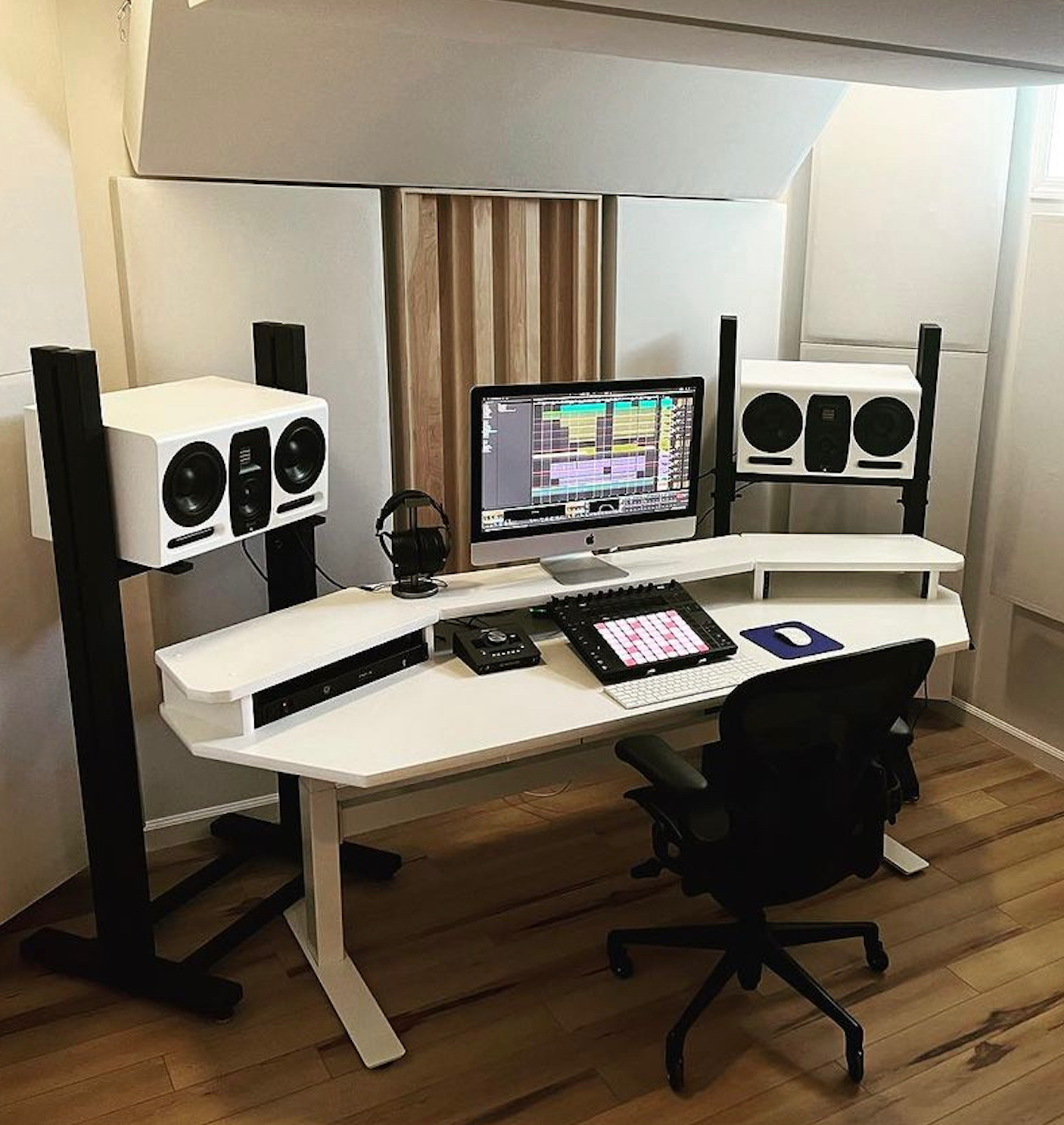
The Real Problem Isn’t Your Monitors
Most people place their monitors directly on a desk. It feels convenient, looks clean, and seems logical.
But here’s what actually happens:
The desk vibrates and colors your sound
Low frequencies get exaggerated or muddy
Stereo imaging becomes less accurate
Reflections bounce off the surface and interfere with clarity
In short, your desk becomes part of your sound system, and not in a good way.
That’s why professionals don’t rely on desks for monitor placement.
What Top Engineers Actually Do
Walk into a professional studio and you’ll notice something immediately:
The monitors are almost never sitting directly on the desk.
Instead, they are:
Elevated to ear level
Isolated from surfaces
Precisely angled toward the listening position
Why? Because even small placement changes can completely shift how you hear your mix.
Proper placement and isolation allow engineers to position monitors for the best possible sound accuracy, rather than being limited by desk height or layout.
Desk vs Stand: The Core Differences
1. Accuracy
When monitors sit on a desk:
Sound reflects off the surface
Frequencies smear together
You lose clarity and separation
With stands:
Sound reaches your ears directly
Imaging becomes sharper
Mix decisions become more reliable
2. Isolation
Desks transfer vibration. That energy travels through the surface and comes back into the speakers, distorting what you hear.
High-quality stands, like our ADJ Studio Monitor Stand and Studio Pro Large Monitor Stands (LMS), are designed to isolate speakers from the console, floor, and surrounding surfaces, resulting in a cleaner and more accurate sound.
3. Positioning
Your monitors should be:
At ear level
Forming an equilateral triangle with your head
Angled correctly toward your listening position
That’s almost impossible to achieve on a desk without compromise.
Adjustable stands solve this completely.
Products like the ADJ1 and ADJ2 allow for:
Height adjustment
Tilt control
Precise alignment
And that alignment is what makes mixes translate outside your room.
Why This Matters More Than You Think
Here’s the part most people underestimate:
Bad placement doesn’t just make your music sound worse, it makes you make worse decisions.
You might:
Overcompensate low end
Misjudge stereo width
Over-EQ your mix
Then when you play it elsewhere… it falls apart.
That’s why many engineers describe switching to proper stands as the moment their mixes finally “clicked.”
The Different Types of Stands (And When to Use Them)
Not every setup is the same; we have options for different scenarios.
Floor Stands (Pro Setup)
Best for full studios
Maximum isolation and stability
Ideal for larger monitors
Examples:
Desktop Stands (Compact Setup)
Great for smaller spaces
Elevate monitors above desk surface
Reduce vibration compared to direct placement
Examples:
Motorized / Advanced Systems
Precision positioning at the push of a button
Used in high-end and commercial studios
Examples:
Motorized monitor stands (MOTO series)
So… Desk or Stand?
Here’s the honest answer:
Desk = convenience
Stands = accuracy
If you’re casually listening, desk placement might be fine.
But if you’re:
mixing
producing
mastering
or trying to improve your sound
There’s no real debate.
Stands win.
Your speakers can only sound as good as the foundation they’re on.
That’s not marketing, that’s physics.
Our reputation is built around this idea:
Better support = better sound
And once you hear the difference, it’s hard to go back.
If your mixes feel inconsistent, unclear, or just “off,” don’t rush to upgrade your gear.
Start with placement.
Because sometimes the biggest upgrade isn’t what you buy…
…it’s where you put it.